SportCode Video AnalysisTM

SportCode Video Analysis is video editing software with all major steps in video technology:

  1. Video Cut & Converter (video splitter/ video slice): Screen where you can cut or convert videos.
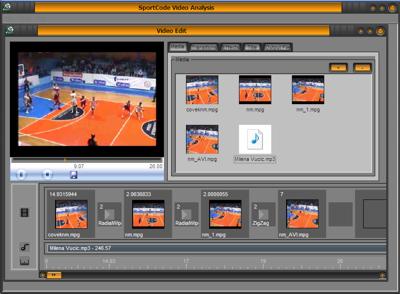
  2. Video Join (video edit/ video merge): Screen where add video files, transitions, effects, titles, background music  and make output video.
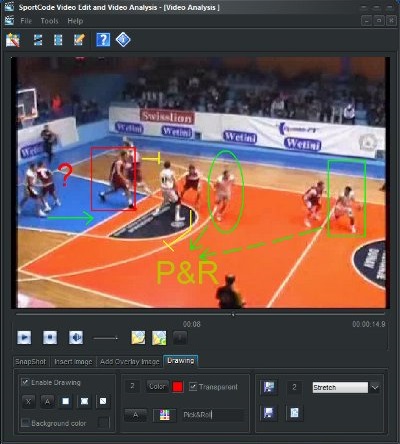
  3. Draw on movie: Additionally, it has Video Analysis screen where you can draw on movie and save it as snapshot picture. You can move movie's slider (use middle mouse wheel) in small steps back and forward and analyze particular moment on the movie.

 You don't need to import media files in your project and wait on that! You can use media file from CD, DVD, usb flash... Input file can be almost any video type: mpeg(DVD/ Svcd/ Vcd/ mpeg1/ mpeg2 in pal/ntsc), wmv, AVI/Divx/xVid. Also, you can use rm, mov, mobile phone 3gp, Flash video FLV ... and other file types  and you get installed most trusted and stable K Lite codec pack for those files during installation. List of supported file is below. Windows does not have mpeg2-dvd codec which enable you to use and see your DVD, you must pay for it from 10 to 20 or more euros/$. You get it from us free of charge! Vista home premium and ultimate edition has mpeg2-dvd codec and has problems with DVD. Our software fix that. Output file can be  mpeg(dvd/svcd/vcd/mpeg1/mpeg2 in pal/ntsc), wmv, AVI/Divx. Application inspects you computer for available codecs(avi, divx, wmv, mpeg) and fill all default values. It has latest skin visual styles and you can easy import .msstyles files, downloaded from web.

Included Sports


  • Basketball
  • Handball
  • Soccer, Soccer Indoor
  • Volleyball
  • Water Polo
  • Hockey, all  types
  • USA Football
  • Rugby
  • GAA Hurling, GAA Football
  • Tennis

Features

    Video cut splitter - video converter
  • set output file format and name
  • set stretch mode
  • set splitting mode: cut in 1 file/few files/ files with selected duration
  • watch video and cut it with by pressing one button, only!
  • convert file by pressing one button, only!
  • movie screen can be bigger or smaller
  • preview, delete, rename output video file
    Video join - video edit
  • Story board with Timeline
  • add/remove video files
  • add/remove audio files
  • add/remove effects
  • add/remove transitions
  • add/remove texts titles
  • make output video
    Draw on movie
  • Quickly and Easily  
  • Select pencil: color, width
  • draw on movie
  • save snapshot picture
  • use picture in video edit

Video Analysis screen

You can move movie's slider in small steps back and forward and analyze particular moment on the movie. Also you can use middle mouse wheel for that when you click on that slider. Use keyboard button space bar for play/pause a movie. You can draw on movie during a pause. Then you can save a snapshot for later analysis or further post processing - scouting report or similar. Select a pencil icon to change pencil: width and color.  Watch tutorial on http://www.youtube.com/watch?v=1ItGKq3ttHw

Video Joint screen

Video Join has movie player on the left and few tabs on the right and film strip below. Click on item to get preview, double click to edit its properties. Use Media file tab to add/remove video or audio file. Drop video and picture file to movie strip in bigger box. Drop audio file to audio strip. You can drop video to audio strip to use audio channel only. Use transition tab or effect tab to select some of them from list. Click on item will shows preview of it. Drop it to movie strip in smaller box. Use Title tab to create multi line title picture which can be dropped to movie strip. Press play button to get preview. Press button Save to save your work in output file.  Watch tutorial on http://www.youtube.com/watch?v=kqiYEUZzwRc
Video Cut screen

Video Cut has movie screen which can be larger or smaller. Select input file and output file and its type. Make a cut with one mouse click or keyboard C button press. Use keyboard space bar for play/pause. Convert input file to output file with one mouse click. If you have SportDraw playbook then you can make a sketch of play/drill, just put SportDraw screen close to movie. Watch tutorial on http://www.youtube.com/watch?v=ccpYBlKS8oc

Type of media files  
   
DVD  DVD playback
   
Supported video containers File extensions
AVI .avi .divx
MPEG-PS .mpg .mpeg .mpe .m1v .m2v .mpv2 .mp2v .m2p .vob .evo .mod
MPEG-TS .ts .m2ts .m2t .mts .pva .tp .tpr
MP4 .mp4 .m4v .mp4v .mpv4 .hdmov
MOV .mov .qt
3GP .3gp .3gpp
Matroska .mkv
Ogg .ogm .ogv
Flash Video .flv
Windows Media .wmv
AMV .amv
RealMedia .rm .rmvb .ram etc.
   
Supported audio files File extensions
MP3 .mp3
Ogg .ogg .oga
Matroska .mka
MPEG-4 Audio .m4a
MPEG-4 Audio raw stream .aac
FLAC .flac
WavPack .wv
Musepack .mpc
OptimFrog .ofr .ofs
Monkey's Audio .ape
Apple Lossless Audio Codec .alac
AMR .amr
AC3 .ac3
DTS .dts
Tracker .it .mo3 .mtm .s3m .umx .xm
RealAudio .ra
   
Supported video formats (within a container) FourCC
MPEG-4/DivX/Xvid DIVX, DX50, XVID, MP4V, 3IVX, BLZ0, DXGM, NDIG, XVIX, DIV3, DIV4, DIV5, DIV6, 3IV1, 3IV2, MP4S, M4S2, RMP4, DM4V, WV1F, FMP4, HDX4, SMP4, LMP4, SEDG, AP41, COL1, DVX3, MPG3
H.264/AVC H264, AVC1, X264, VSSH, DAVC, PAVC
MPEG-1 MPEG, MPG1, 1001
MPEG-2 MPG2, 1002, EM2V, MMES
VC-1 WVC1
MP41 MP41, MPG4, DIV1
MP42 MP42, DIV2
MP43 MP43
H.261 H261, M261
H.263 H263, L263, M263, U263, X263, S263
Flash Video (H.263) FLV1
Flash Video (VP6) FLV4, VP6F
Theora THEO
VP3 VP31
VP5 VP50
VP6 VP60, VP61, VP62, VP6A
VP7 VP70
Huffyuv HFYU, FFVH
MJPEG MJPG, LJPG, MJLS, AVRN, MJPA, SP5X, AMVV
Sorenson Video 1 SVQ1
Sorenson Video 3 SVQ3
DV DVSD, DV25, DV50, CDVC, CDV5, DVIS, PDVC
QuickTime Planar RGB 8BPS
QuickTime Animation QRLE
QuickTime RPZA RPZA
FFV1 FFV1
Camstudio CSCD
CorePNG PNG1, MPNG
LOCO LOCO
LCL Lossless Codec Library MSZH
TechSmith Camtasia TSCC
ZLIB Lossless Codec Library ZLIB
Zip Motion Blocks Video ZMVB
Autodesc RLE AASC
ASUS v1/v2 ASV1, ASV2
ATI VCR1 VCR1
Cinepak CVID
Creative YUV CYUV
Intel Indeo 2 RT21
Intel Indeo 3 IV31, IV32
Intel Indeo 4 IV41
Intel Indeo 5 IV50
I.263 I263
Fraps FPS1
Miro VideoXL VIXL
MS Video 1 CRAM
MS RLE MRLE
Q-Team QPEG QPEG, Q1.0, Q1.1
RealVideo v1/v2 RV10, RV20
RealVideo v3/v4 RV30, RV40
Truemotion v1/v2 TM20
Ultimotion ULTI
Winnov v1 WNV1
   
Supported audio formats (within a container) AudioTag/FourCC
MP3 55, 85
MP2 80
MP1  
AC3 2000, 8192
E-AC3 EAC3
DTS 2001
Dolby TrueHD/MLP DTSH
AAC AAC0, 00FF, 706D, MP4A
LPCM LPCM
Vorbis 26447, 674F
Vorbis ACM 26479, 26481, 676F, 6771
FLAC f1ac
WavPack  
Musepack  
AMR FE, samr
True Audio 77a1
Microsoft ADPCM 2, 17
IMA ADPCM 11, 61, 62, AMVA
Creative ADPCM 200
G.726 45
Mu-law 7, 6c75, ULAW
A-law ALAW
MS GSM 49
TrueSpeech  
QDM2 QDM2
MACE3 MAC3
MACE6 MAC6
RealAudio v1/v2 345F3431, 385F3832
Intel Music Coder (IMC) 1025
Atrac3 270
Nellymoser NELL
WMA7 160
WMA8 161
DivX ;) audio 161, 353
   
Video encoding (VFW)  
DivX  
Xvid  
x264  
VP6  
VP7  
Indeo 4  
Indeo 5  
I.263  
Huffyuv  
YV12  
   
Audio encoding (ACM)  
MP3 (LAME)  
AC3  


SportCode Video Analysis software is related to:

  • Basketball video editing software which manipulate with basketball video drills and basketball video plays
  • Handball video editing software which manipulate with handball video drills and handball video plays
  • Soccer video editing software which manipulate with soccer video drills and soccer video plays
  • Football video editing software which manipulate with football video drills and football video plays
  • Volleyball video editing software-volleyball video analysis which manipulate with volleyball video drills and volleyball video plays, volleyball video clips
  • Water polo video editing software which manipulate with water polo video drills and water polo video plays, water polo videos
  • Hockey video editing software-hockey video analysis which manipulate with hockey video drills and hockey video plays, hockey videos, hockey video clips
  • Rugby video editing software-rugby video analysis which manipulate with rugby video drills and rugby video plays, rugby videos, rugby video clips
  • Gaa Football, Hurling video editing software-hurling video analysis which manipulate with hurling video drills and hurling video plays, hurling video, hurling video clips

Contact us for more details.